What's in the Book

590 pages. 8 parts. 53 chapters. A spiral path through PostgreSQL — from your first query to vector search, triggers, and custom extensions.

8Parts
53Chapters
437SQL Queries
15Datasets

Preface

As a developer, The Art of PostgreSQL is the book you need to read in order to get to the next level of proficiency.

After all, a developer's job encompasses more than just writing code. Our job is to produce results, and for that we have many tools at our disposal. SQL is one of them, and this book teaches you all about it.

PostgreSQL is used to manage data in a centralized fashion, and SQL is used to get exactly the result set needed from the application code. An SQL result set is generally used to fill in-memory data structures so that the application can then process the data. So, let's open this book with a quote about data structures and application code:

Data dominates. If you've chosen the right data structures and organized things well, the algorithms will almost always be self-evident. Data structures, not algorithms, are central to programming.

Rob Pike, Notes on Programming in C (1989)
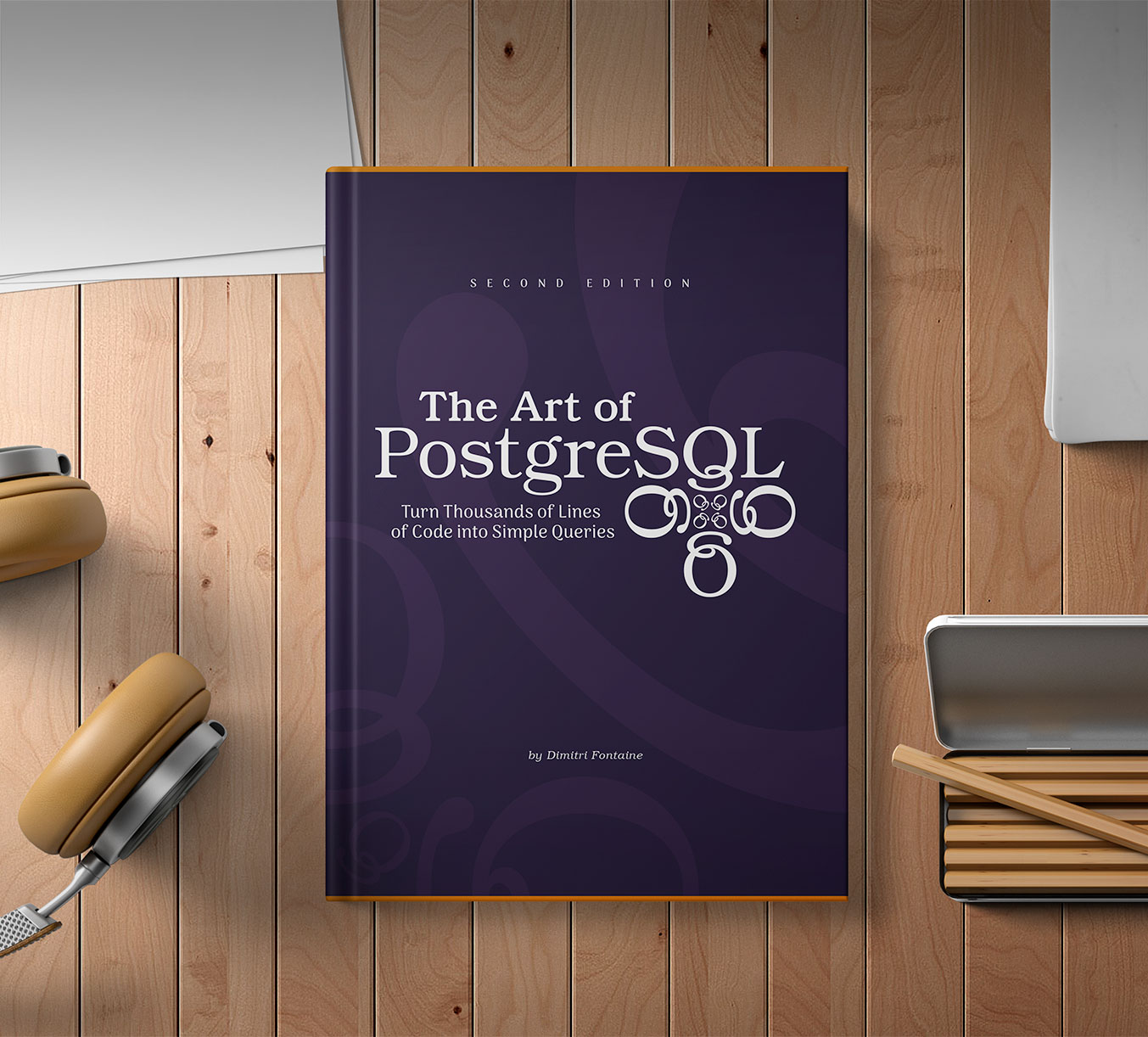
The Art of PostgreSQL — book cover

About the Book

This book is intended for developers working on applications that use a database server. The book specifically addresses the PostgreSQL RDBMS: it actually is the world's most advanced Open Source database, just like it says in the tagline on the official website. By the end of this book you'll know why, and you'll agree!

I wanted to write this book after having worked with many customers who were making use of only a fraction of what SQL and PostgreSQL are capable of delivering. In most cases, developers I met with didn't know what's possible to achieve in SQL. As soon as they realized — or more exactly, as soon as they were shown what's possible to achieve —, replacing hundreds of lines of application code with a small and efficient SQL query, then in some cases they would nonetheless not know how to integrate a raw SQL query in their code base.

Integrating a SQL query and thinking about SQL as code means using the same advanced tooling that we use when using other programming languages: versioning, automated testing, code reviewing, and deployment. Really, this is more about the developer's workflow than the SQL code itself…

In this book, you will learn best practices that help with integrating SQL into your own workflow, and through the many examples provided, you'll see all the reasons why you might be interested in doing more in SQL. Primarily, it means writing fewer lines of code. As Dijkstra said, we should count lines of code as lines spent, so by learning how to use SQL you will be able to spend less to write the same application!

The practice is pervaded by the reassuring illusion that programs are just devices like any others, the only difference admitted being that their manufacture might require a new type of craftsmen, viz. programmers. From there it is only a small step to measuring "programmer productivity" in terms of "number of lines of code produced per month". This is a very costly measuring unit because it encourages the writing of insipid code, but today I am less interested in how foolish a unit it is from even a pure business point of view. My point today is that, if we wish to count lines of code, we should not regard them as "lines produced" but as "lines spent": the current conventional wisdom is so foolish as to book that count on the wrong side of the ledger.

On the cruelty of really teaching computing science, Edsger Wybe Dijkstra (EWD1036, 1988)

How this book is organised

Each part of The Art of PostgreSQL can be read on its own, or you can read this book from the first to the last page in the order of the parts and chapters therein. A great deal of thinking has been put into the ordering of the parts, so that reading The Art of PostgreSQL in a linear fashion should provide the best experience.

The skill progression throughout the book is not linear. Each time a new SQL concept is introduced, it is presented with simple enough queries, in order to make it possible to focus on the new notion. Then, more queries are introduced to answer more interesting business questions.

Complexity of the queries usually advances over the course of a given part, chapter after chapter. Sometimes, when a new chapter introduces a new SQL concept, complexity is reset to very simple queries again. That's because for most people, learning a new skill set does not happen in a linear way. Having this kind of difficulty organisation also makes it easier to dive into a given chapter out-of-order.
Accessible start
Every chapter opens with something you can run immediately
Real datasets
15 open datasets — F1, Chinook, Geonames, Last.fm, MoMA, and more
Advanced techniques
Every chapter reaches techniques most books never cover
Worth re-reading
What comes later illuminates what came before
Part 2

Introduction

3 chapters · 12 SQL queries

The introduction of this book intends to convince application developers such as you, dear reader, that there's more to SQL than you might think. It begins with a very simple data set and simple enough queries, that we compare to their equivalent Python code. Then we expand from there with a very important trick that's not well known, and a pretty advanced variation of it.

Ch 2
Structured Query Language A first use case · Loading the dataset · COPY error handling (PG 17) · SQL Injection · Server-side prepared statements · Computing weekly changes
Ch 3
Software Architecture Why PostgreSQL? · The PostgreSQL documentation · Architecture trade-offs Why Postgres?
Ch 4
Getting Ready to Read This Book Running a query · Finding queries while reading · Using the companion lab How to Learn SQL

Companion Lab included — run every query in the book from your browser.
docker compose up → PostgreSQL + query UI at localhost:8042. Learn more about the lab →

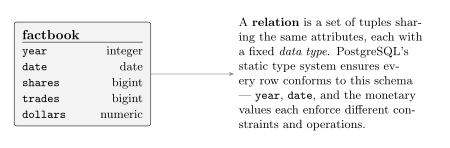
Factbook data model
The factbook relation — retail sales by day
What you can write after Part 2
with computed_data as (
  select cast(date as date) as date,
         to_char(date, 'Dy') as day,
         coalesce(dollars, 0) as dollars,
         lag(dollars, 1)
           over(
             partition by extract('isodow' from date)
                 order by date
           ) as last_week_dollars
    from generate_series(
           date :'start' - interval '1 week',
           date :'start' + interval '1 month'
                         - interval '1 day',
           interval '1 day'
         ) as calendar(date)
         left join factbook using(date)
)
  select date, day,
         to_char(coalesce(dollars, 0),
                 'L99G999G999G999') as dollars,
         case when dollars is not null
               and dollars <> 0
              then round(100.0
                         * (dollars - last_week_dollars)
                         / dollars, 2)
          end as "WoW %"
    from computed_data
   where date >= date :'start'
order by date;

Generate a full month calendar from a date parameter, fill in missing days, and compute week-over-week percentage changes — entirely in SQL.

Part 3

Writing SQL Queries

6 chapters · 48 SQL queries

The third part of the book covers how to write a SQL query as an application developer. We answer several important questions here:

  • Why use SQL rather than your usual programming language?
  • How to integrate SQL in your application source code?
  • How to work at the SQL prompt, the psql REPL?
  • What's an indexing strategy and how to approach indexing?

A simple Python application is introduced as a practical example illustrating the different answers provided. In particular, this part insists on when to use SQL to implement business logic.

Ch 5
Business Logic SQL as business logic · Use cases · Correctness and efficiency · Stored procedures as data access API · Where to implement business logic
Ch 6
A Small Application Readme-first development · Chinook database · Music catalog queries · Albums by artist · Top-N artists by genre
Ch 7
The SQL REPL — An Interactive Setup Intro to psql · The .psqlrc setup · Transactions and psql behavior · A reporting tool · Discovering a schema · Interactive query editor
Ch 8
SQL is Code SQL style guidelines · Comments · Unit tests · Regression tests
Ch 9
Indexing Strategy Indexing for constraints · Indexing for queries · Cost of index maintenance · B-tree, GiST, SP-GiST, GIN, BRIN, Hash, Bloom · Partial, covering, and functional indexes · Fillfactor and HOT updates Indexing StrategyReading EXPLAIN
Ch 10
Interview with Yohann Gabory Django ORM, raw SQL, PostgreSQL-specific features
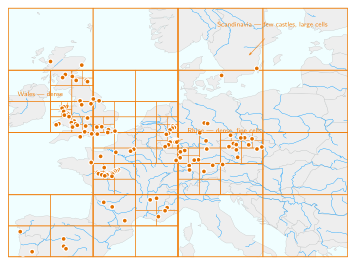
SP-GiST quadtree over European castle ruins
SP-GiST adaptive quadtree over European castle ruins — computed from actual PostGIS data using a recursive CTE that mirrors the index structure; the SQL is in the book
What you can write after Part 3
-- name: list-albums-by-artist
-- Returns album titles and total duration
-- for a given artist, ordered alphabetically.
  select album.title as album,
         sum(milliseconds)
           * interval '1 ms' as duration
    from album
         join artist using(artistid)
         left join track using(albumid)
   where artist.name = :name
group by album
order by album;

Named, version-controlled SQL files with parameters, style conventions, and unit tests — SQL treated as a first-class citizen alongside your application code.

Part 4

SQL Toolbox

10 chapters · 86 SQL queries

The fourth part of The Art of PostgreSQL introduces most of the SQL concepts that you need to master as an application developer. It begins with the basics, because you need to build your knowledge and skill set on top of those foundations.

Advanced SQL concepts are introduced with practical examples: every query refers to a data model that's easy to understand, and is given in the context of a "business case", or "user story".

This part covers SQL clauses and features such as ORDER BY and k-NN sorts, the GROUP BY and HAVING clause and GROUPING SETS, along with classic and advanced aggregates, and then window functions. This part also covers the infamous NULL, and what's a relation and a join.

Ch 11–13
Foundations Getting data · SQL language overview · Queries, DML, DDL, TCL, DCL What is an SQL Relation?
Ch 14
Select, From, Where Anatomy of a SELECT · Projection · Computed values and aliases · Data sources · Understanding joins · Restrictions What is an SQL JOIN?
Ch 15
Order By, Limit, No Offset Ordering · Incremental sort (PG 13) · kNN ordering and GiST indexes · Top-N sorts · Pagination without OFFSET
Ch 16
Group By, Having, With, Union All Aggregates · GROUP BY · HAVING · Grouping Sets · GROUPING() · Ordered-set aggregates · ANY_VALUE() · FETCH FIRST WITH TIES · CTEs · Recursive CTEs · SEARCH and CYCLE · DISTINCT ON · UNION / EXCEPT GROUP BY & HAVINGAggregatesFILTER clausePercentilesWITH RECURSIVE
Ch 17
Understanding Nulls Three-valued logic · NOT NULL constraints · Outer joins introducing nulls · Using NULL in applications NULL in SQL: Three-Valued Logic
Ch 18
Understanding Window Functions Windows and frames · ROWS, RANGE, and GROUPS · Partitioning · rank() and dense_rank() · Running totals and moving averages · Gaps and islands · Sessionization · Cohort analysis OVER clauseROW_NUMBER & RANKFrame SemanticsRunning TotalsSessionization
Ch 19
Understanding Relations and Joins Relations · SQL join types · JOIN amplification · LATERAL joins · Semi-joins and anti-joins What is a JOIN?JOIN CardinalityLATERAL Top-NSilent row lossCOUNT after JOIN
Ch 20
Interview with Markus Winand SQL performance, standard compliance, use-the-index-luke.com
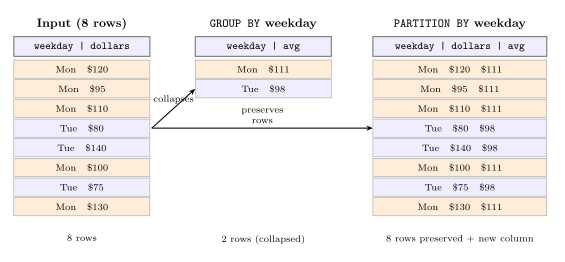
GROUP BY vs Window Functions
GROUP BY collapses rows; window functions keep them
What you can write after Part 4
with points as (
   select year as season, driverid,
          constructorid,
          sum(points) as points
     from results join races using(raceid)
 group by grouping sets(
            (year, driverid),
            (year, constructorid))
   having sum(points) > 0
),
tops as (
   select season,
          max(points) filter(where driverid is null)
            as ctops,
          max(points) filter(where constructorid is null)
            as dtops
     from points
 group by season
),
champs as (
   select tops.season,
          d.driverid, d.points,
          c.constructorid, c.points
     from tops
          join points d
            on d.season = tops.season
           and d.constructorid is null
           and d.points = tops.dtops
          join points c
            on c.season = tops.season
           and c.driverid is null
           and c.points = tops.ctops
)
  select season,
         format('%s %s', forename, surname)
           as "Driver's Champion",
         constructors.name as "Constructor"
    from champs
         join drivers using(driverid)
         join constructors using(constructorid)
order by season;

One query, all F1 world champions since 1950 — driver and constructor — using GROUPING SETS and chained CTEs.

Part 5

Data Types

6 chapters · 84 SQL queries

The fifth part of this book covers the main PostgreSQL data types you can use and benefit from as an application developer. PostgreSQL is an ORDBMS: Object-Relational Database Management System. As a result, data types in PostgreSQL are not just the classics numbers, dates, and text. There's more to it, and this part covers a lot of ground.

Ch 21
Serialization and Deserialization Data representation · Marshalling · Application-layer vs. database-layer types
Ch 22
Some Relational Theory Attribute values · Data domains and data types · Consistency and data type behavior What is an SQL Relation?
Ch 23
PostgreSQL Data Types Boolean · Character and text · Server/client encoding · Built-in C.UTF-8 collation (PG 17) · Numbers · Sequences and serial · UUID · Date/time and time zones · Intervals · Network address types · Ranges · Multi-ranges (PG 14) Range Types & Temporal Constraints
Ch 24
Denormalized Data Types Arrays · Composite types · XML · JSON and JSONB · SQL/JSON path language (PG 12) · IS JSON predicate (PG 16) · SQL/JSON constructors and JSON_TABLE (PG 16–17) · Enum JSONB and Arrays
Ch 25
PostgreSQL Extensions Type extensions overview · Custom types and operators
Ch 26
Interview with Grégoire Hubert POMM project, business logic layers, relational constraints
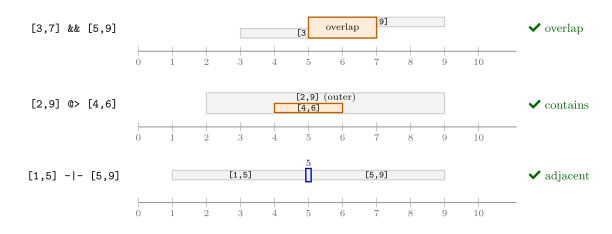
Range operators
PostgreSQL range operators — containment, overlap, adjacency
What you can write after Part 5
create table rates (
  currency text,
  validity daterange,
  rate     numeric,
  exclude using gist (
    currency with =,
    validity with &&
  )
);

insert into rates(currency, validity, rate)
     select currency,
            daterange(date,
              lead(date) over(
                partition by currency
                    order by date),
              '[)') as validity,
            rate
       from raw.rates
   order by date;

A currency rates table where overlapping validity periods are impossible — enforced by an exclusion constraint on a range type, not application code.

Part 6

Data Modeling

8 chapters · 63 SQL queries

The sixth part of The Art of PostgreSQL covers the basics of relational data modeling, which is the most important skill you need to master as an application developer. Given a good database model, every single SQL query is easy to write, things are kept logical, and data is kept clean. With a bad design… well my guess is that you've seen what happens with a not-great data model already, and in many cases that's the root of developers' dislike for the SQL language.

This part comes late in the book for a reason: without knowledge of some of the advanced SQL facilities, it's hard to anticipate that a data model is going to be easy enough to work with, and developers then tend to apply early optimizations to the model to try to simplify writing the code. Well, most of those optimizations are detrimental to our ability to benefit from SQL.

Ch 27
Object Relational Mapping ORM capabilities and limits · When to go beyond the ORM · Raw SQL in ORM contexts
Ch 28
Tooling for Database Modeling How to write a database model · Generating random data · Modeling example with timezones The Schema Decision AI Cannot Make
Ch 29
Normalization Normal forms · Update, insertion, and deletion anomalies · Modeling an address field · Primary keys · Surrogate keys · Foreign keys · NOT NULL · Check constraints and domains · NULLS NOT DISTINCT (PG 15) · Generated stored columns (PG 12) · Virtual generated columns (PG 18) · Row level security · Exclusion constraints The Three Database AnomaliesForeign Keys & Planner Trust
Ch 30
Practical Use Case: Geonames Feature classification · Countries · Administrative zoning · Geolocation data · GiST indexing
Ch 31
Modelization Anti-Patterns Entity-Attribute-Value · Multiple values per column · UUID pitfalls
Ch 32
Denormalization Materialized views · History tables and audit trails · Validity period as a range · Pre-computed values · Enumerated types · Sparse matrix model · Partitioning (PG 12–17 improvements) Range Types & Temporal Constraints
Ch 33
Not Only SQL Schemaless design with JSONB · Durability trade-offs · Scaling out
Ch 34
Interview with Álvaro Hernández Tortosa ToroDB, relational vs. document models, PostgreSQL as a NoSQL target
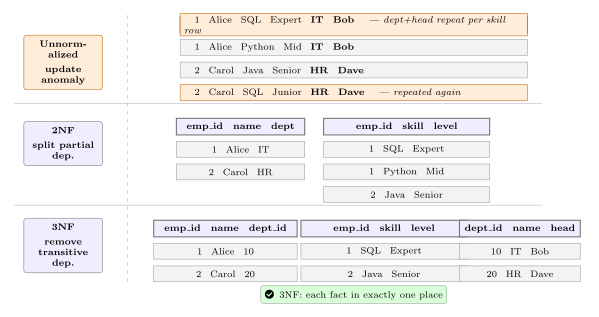
Normal forms diagram
Normal forms — each level eliminates a class of anomaly
What you can write after Part 6
create view v.season_points as
  select year as season, driver,
         constructor, points
    from seasons
         left join lateral (
            select drivers.surname as driver,
                   constructors.name as constructor,
                   sum(points) as points
              from results
                   join races using(raceid)
                   join drivers using(driverid)
                   join constructors using(constructorid)
             where races.year = seasons.year
          group by grouping sets(
                     drivers.surname,
                     constructors.name)
            order by drivers.surname is not null,
                     points desc
         ) as points on true
order by year, driver is null, points desc;

create materialized view cache.season_points as
  select * from v.season_points;

create index on cache.season_points(season);

A three-layer design: raw tables → a logical view → a materialized cache, with a LATERAL join computing grouping sets per season. Fast reads, clean separation.

Part 7

Data Manipulation and Concurrency Control

8 chapters · 57 SQL queries

The seventh part of this book covers DML and concurrency, the heart of any live database. DML stands for "Data Manipulation Language": it's the part of SQL that includes INSERT, UPDATE, and DELETE statements.

The main feature of any RDBMS is how it deals with concurrent access to a single data set, in both reading and writing. This part covers isolation and locking, computing and caching in SQL complete with cache invalidation techniques, and more.

Ch 35
Another Small Application Tweet normalization · Practical DML introduction
Ch 36
Insert, Update, Delete INSERT INTO · INSERT INTO ... SELECT · UPDATE · DELETE · Truncate · MERGE (PG 15) · RETURNING OLD and NEW (PG 18)
Ch 37
Isolation and Locking Transactions and isolation · SSI (Serializable Snapshot Isolation) · Concurrent updates · Modeling for concurrency · Testing concurrency behavior
Ch 38
Computing and Caching in SQL Views · Materialized views · Cache invalidation strategies
Ch 39
Triggers Transactional event-driven processing · Trigger and counter anti-pattern · Fixing trigger behavior
Ch 40
Listen and Notify PostgreSQL notifications · Event publication system · Notifications and cache maintenance · Limitations · Driver support
Ch 41
Batch Update — MoMA Collection Updating open datasets · Concurrency patterns · ON CONFLICT DO NOTHING
Ch 42
Interview with Kris Jenkins Functional programming, concurrency by design, YeSQL library
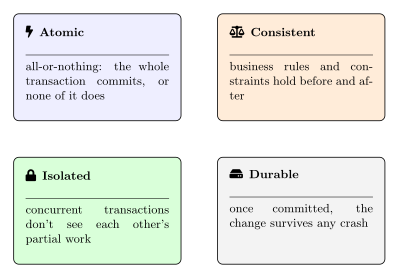
ACID properties diagram
ACID — the contract your database makes with your application
What you can write after Part 7
merge into driver_points dp
using (
      select d.driverid, d.surname,
             coalesce(sum(res.points), 0) as total
        from drivers d
             left join results res using(driverid)
       group by d.driverid, d.surname
) src
on dp.driverid = src.driverid
when matched then
    update set total = src.total,
               surname = src.surname
when not matched by target then
    insert (driverid, surname, total)
    values (src.driverid, src.surname, src.total)
when not matched by source then
    delete;

One MERGE statement: insert new drivers, update existing totals, remove deleted rows — atomically, safe under concurrent writes.

Part 8

PostgreSQL Extensions

11 chapters · 87 SQL queries

The eighth part of The Art of PostgreSQL covers a selection of very useful PostgreSQL Extensions and their impact on simplifying application development when using PostgreSQL.

We cover auditing changes with hstore, the pg_trgm extension to implement auto-suggestions and auto-correct in your application search forms, user-defined tags and how to efficiently use them in search queries, and then we use ip4r for implementing geolocation oriented features. Finally, hyperloglog is introduced to solve a classic problem with high cardinality estimates and how to combine them.

Ch 43
What's a PostgreSQL Extension? Inside extensions · Installing and using · Finding extensions · Authoring extensions · Noteworthy extensions: bloom, earthdistance, hstore, ltree, pg_trgm, PostGIS, ip4r, citus, pgpartman, postgres-hll, prefix, madlib, RUM
Ch 44
Auditing Changes with hstore Introduction to hstore · Comparing hstores · Auditing changes with a trigger · Testing the audit trigger · From hstore back to a regular record
Ch 45
Last.fm Million Song Dataset Loading a million-row music dataset · Schema design for analytics · Real-world query patterns
Ch 46
Using Trigrams for Typos pg_trgm · Trigrams, similarity, and searches · Auto-complete and auto-correct · Trigram indexing · Reindexing after PG 18 upgrade
Ch 47
Denormalizing Tags with intarray Advanced tag indexing · Tag searches · User-defined tags
Ch 48
The Most Popular Pub Names Pub names database · Normalizing geospatial data · Geolocating the nearest pub (k-NN search)
Ch 49
How Far is the Nearest Pub? earthdistance contrib · Great-circle distance · Most popular pub names by city
Ch 50
Geolocation with PostgreSQL ip4r · Loading GeoLite data · Finding an IP address in IP ranges · Emergency pub finder
Ch 51
Counting Distinct Users with HyperLogLog HyperLogLog fundamentals · Counting unique tweet visitors · Lossy unique count · Scheduling estimate computations · Combining unique visitor counts across time windows
Ch 52
Vector Search with pgvector New in 2026 Installing pgvector · The vector type · Distance operators (L2, cosine, inner product) · IVFFlat and HNSW indexes · Measuring recall · Hybrid search with RRF
Ch 53
Interview with Craig Kerstiens Extensions in the cloud, Citus, Heroku, extension ecosystem
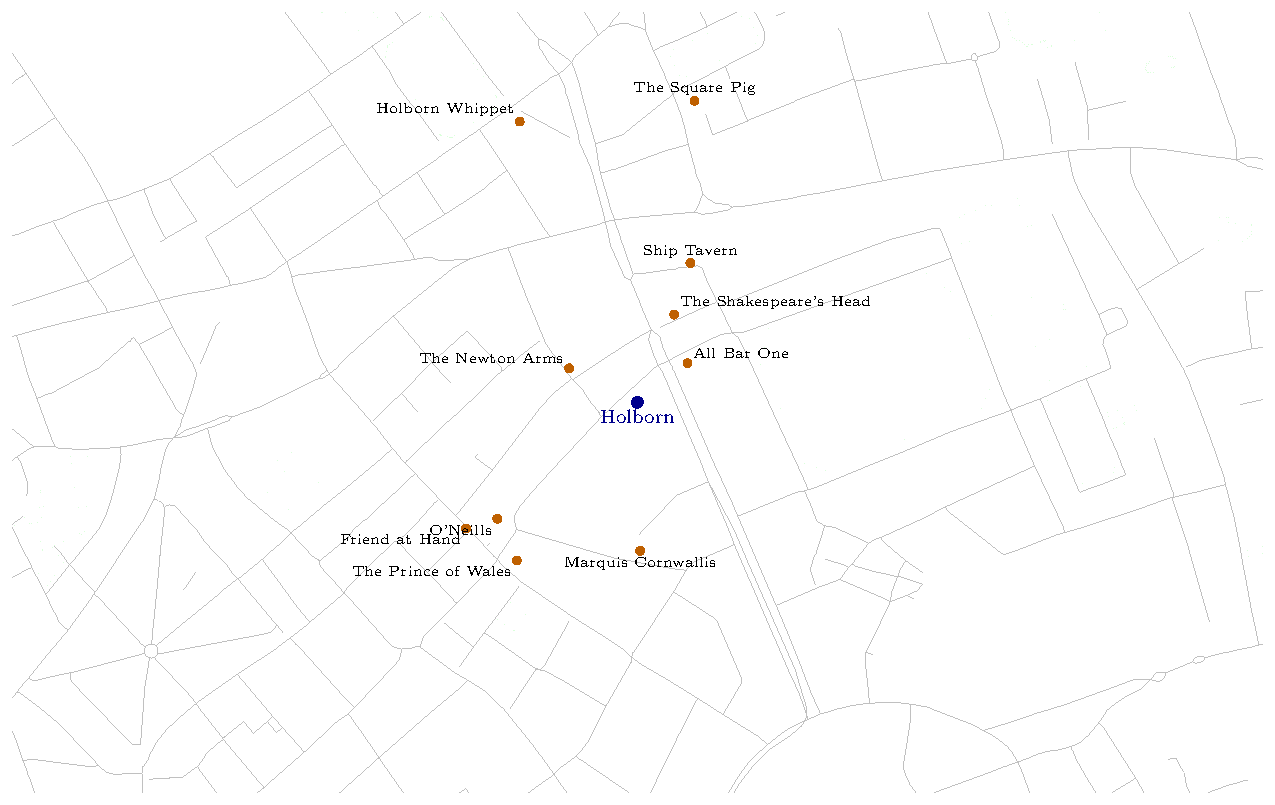
k-NN pub search result map
k-NN search result: nearest pubs from a given location
What you can write after Part 8
CREATE EXTENSION IF NOT EXISTS pg_trgm;

WITH
-- Semantic: nearest neighbours by cosine distance
vec AS (
    SELECT id, title, artist,
           row_number() OVER (
             ORDER BY embedding <=> $1) AS rank
      FROM track_embedding LIMIT 50
),
-- Lexical: trigram similarity on title
trgm AS (
    SELECT id, title, artist,
           row_number() OVER (
             ORDER BY similarity(title, $2) DESC) AS rank
      FROM track_embedding
     WHERE title % $2 LIMIT 50
),
-- Reciprocal Rank Fusion
fused AS (
    SELECT coalesce(v.id, t.id) AS id,
           coalesce(v.title, t.title) AS title,
           coalesce(v.artist, t.artist) AS artist,
           coalesce(1.0 / (v.rank + 60), 0) +
           coalesce(1.0 / (t.rank + 60), 0) AS score
      FROM vec v FULL JOIN trgm t USING (id)
)
SELECT id, title, artist,
       round(score::numeric, 5) AS score
  FROM fused ORDER BY score DESC LIMIT 10;

Hybrid search: combine pgvector's cosine distance with pg_trgm's fuzzy matching via Reciprocal Rank Fusion — results that match both meaning and spelling.

590 pages. Every query you need.

Available as PDF, ePub, and paperback. Free update for existing purchasers. 30-day refund guarantee.