Foundations of Window Functions
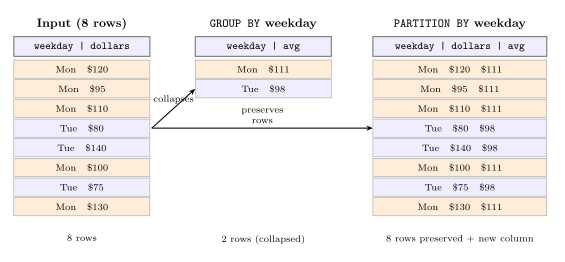
Window functions compute a value for each row using a set of related rows, without collapsing them. The OVER clause turns any aggregate into a window function; PARTITION BY divides the window into independent groups.
Book reference: Chapter 18 — Understanding Window Functions
Free preview: The OVER Clause
select surname, position,
       milliseconds * interval '1ms'
         as racetime,
       interval '1ms' *
       ( milliseconds
         - lag(milliseconds, 1)
           over(order by position)
       ) as diff
  from results
       join drivers using(driverid)
 where raceid = 890
 order by position limit 5;
Five F1 finishers with their gap to the car ahead, computed from lap milliseconds.
Ranking & Row Navigation
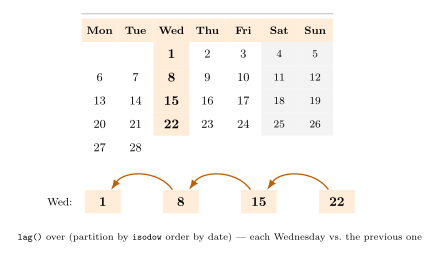
ROW_NUMBER, RANK, and DENSE_RANK assign positions within an ordered partition — differing only in how they handle ties. LEAD and LAG navigate to adjacent rows without a self-join.
Book reference: Chapter 18 — Understanding Window Functions
Free preview: ROW_NUMBER, RANK, DENSE_RANK
select surname, laps,
       rank() over(
         order by laps desc, milliseconds
       ) as rnk,
       dense_rank() over(
         order by laps desc, milliseconds
       ) as dense,
       milliseconds * interval '1ms'
         as racetime
  from results
       join drivers using(driverid)
 where raceid = 890
 order by rnk;
Race finishers ranked by both RANK and DENSE_RANK, showing how tied rows get different position numbers.
Running & Moving Aggregates
SUM() OVER(ORDER BY) produces a running total; add a ROWS N PRECEDING frame and it becomes a moving window. The default frame changes when ORDER BY is present.
Book reference: Chapter 18 — Understanding Window Functions
Free preview: Running Totals & Moving Averages
select x,
       sum(x) over()
         as total,
       sum(x) over(order by x)
         as running_total,
       array_agg(x) over(order by x)
         as running_set
  from generate_series(1, 5) as t(x);
Running total and accumulated array over integers 1–5, with and without ORDER BY in the window.
Frame Semantics Deep Dive
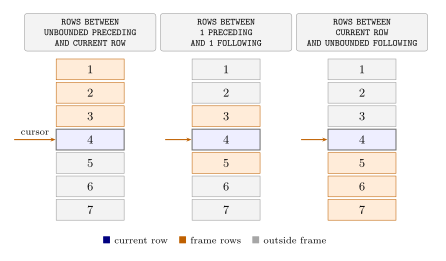
ROWS, RANGE, and GROUPS each define which rows enter the frame relative to the current row. Subtle differences emerge with duplicate values, and EXCLUDE lets you remove specific rows from the frame.
Book reference: Chapter 18 — Understanding Window Functions
Free preview: Frame Semantics
select x,
       array_agg(x) over w1
         as rows_frame,
       array_agg(x) over w2
         as range_frame
  from (select x*x
          from generate_series(1,10)
               as gs(x)
       ) t(x)
window
  w1 as (order by x
         rows  between 1 preceding
                   and 2 following),
  w2 as (order by x
         range between 10 preceding
                   and 20 following);
ROWS and RANGE frames compared on squared integers, showing which rows each mode includes per position.
Advanced Analytical Patterns
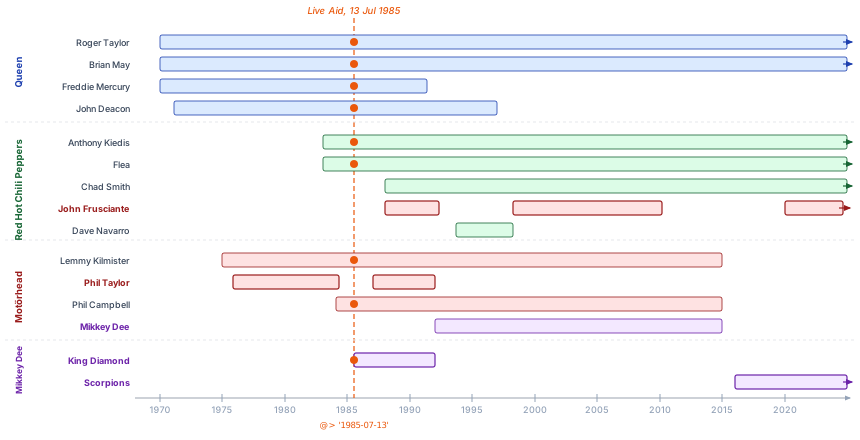
Sessionization, gaps & islands, and cohort analysis are classic time-series patterns. Window functions solve them in pure SQL using the running-SUM trick — no procedural loops.
Book reference: Chapter 18 — Understanding Window Functions
Free preview: Sessionization
with lap_flags as (
  select driverid, lap, milliseconds,
         case
           when milliseconds
                > median_ms * 1.2
           then 1 else 0
         end as is_pit
    from laptimes
         join lap_stats using(driverid)
   where raceid = 890
),
stints as (
  select driverid, lap, is_pit,
         sum(is_pit) over(
           partition by driverid
           order by lap
         ) as stint
    from lap_flags
)
select surname, stint,
       min(lap) as from_lap,
       max(lap) as to_lap,
       round(avg(milliseconds))
         * interval '1ms' as avg_lap
  from stints
       join results  using(driverid)
       join drivers  using(driverid)
 where is_pit = 0
 group by driverid, surname, stint;
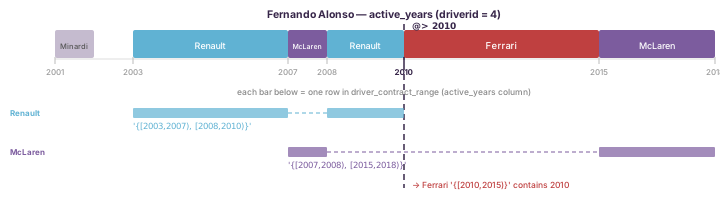
Per-driver pit stints for a race, with average lap time per stint, derived from outlier lap detection.
Performance & Query Design
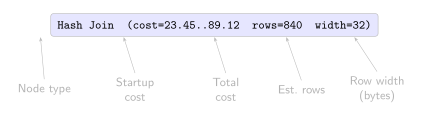
Every window query sorts its data and produces a WindowAgg node in EXPLAIN. This module covers sorting cost, spec sharing across multiple windows, and anti-patterns that force unwanted re-scans.
Book reference: Chapter 18 — Understanding Window Functions
Free preview: Reading EXPLAIN
explain
select surname, laps,
       row_number()
         over(order by milliseconds)
         as position,
       milliseconds * interval '1ms'
         as racetime
  from results
       join drivers using(driverid)
 where raceid = 890;
EXPLAIN output for a ranked race-result query using row_number() over milliseconds.
Composing Complex Queries
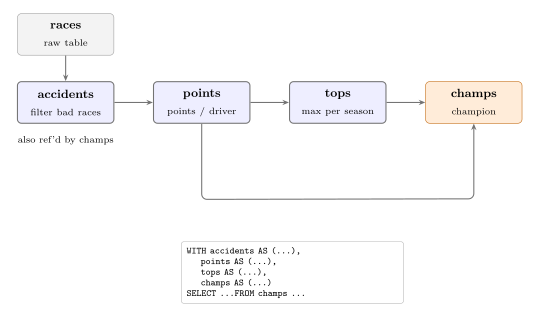
When a window result must be filtered or joined, wrap it in a CTE or subquery — window functions cannot appear in WHERE or HAVING. Multi-pass patterns with chained CTEs and LATERAL are covered here.
Book reference: Chapter 18 — Understanding Window Functions
Free preview: LATERAL: Top-N Per Group
with season_points as (
  select r.year, res.driverid,
         sum(res.points) as points
    from f1db.results res
    join f1db.races   r using(raceid)
   group by r.year, res.driverid
),
season_ranks as (
  select year, driverid, points,
         rank() over(
           partition by year
           order by points desc
         ) as season_rank
    from season_points
)
select d.surname,
       count(*) filter(
         where season_rank = 1
       ) as titles,
       count(*) as top3_seasons
  from season_ranks
  join f1db.drivers d using(driverid)
 where season_rank <= 3
 group by d.driverid, d.surname
 order by titles desc limit 10;
Top 10 F1 drivers by championship titles, with total top-3 season count across all seasons.
Designing Analytical Workloads
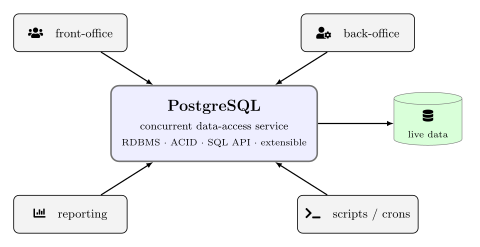
Materialized views cache expensive window computations and support incremental refresh for rolling metrics. This module covers ELT patterns and trade-offs when moving work to columnar OLAP systems.
Book reference: Chapter 18 — Understanding Window Functions
with running as (
  select r.year, r.round,
         res.driverid,
         d.surname        as driver,
         res.points       as race_points,
         sum(res.points) over(
           partition by r.year,
                        res.driverid
           order by r.round
           rows unbounded preceding
         )                as cum_points
    from f1db.results  res
    join f1db.races    r using(raceid)
    join f1db.drivers  d using(driverid)
   where r.year = 2017
)
select year, round, driver,
       race_points, cum_points,
       rank() over(
         partition by year, round
         order by cum_points desc
       ) as standing
  from running
 order by round, standing limit 15;
Per-round championship standings for the 2017 season, with cumulative points and standing after each race.