Frame Semantics: ROWS, RANGE, and GROUPS
A window frame defines exactly which rows each window function sees. ROWS counts positions, RANGE counts values, GROUPS counts distinct peers. Mixing them up produces silent bugs.
Every window function with an ORDER BY inside OVER operates on a frame
— the subset of rows visible to that call. The frame specification comes after
ORDER BY in the OVER clause. When you omit it, PostgreSQL applies a
default: RANGE UNBOUNDED PRECEDING TO CURRENT ROW.
That default is a growing window, not a fixed one. It is correct for running totals but wrong for moving averages. Understanding frames is what separates queries that produce plausible-looking wrong numbers from queries that are actually right.
The three frame modes, each shown below:
ROWScounts physical row positions.ROWS BETWEEN 1 PRECEDING AND 1 FOLLOWINGis always exactly three rows.RANGEcounts value ranges on theORDER BYcolumn.RANGE BETWEEN 10 PRECEDING AND 20 FOLLOWINGincludes every row whose value falls within that interval.GROUPScounts distinct peer groups.GROUPS BETWEEN 1 PRECEDING AND 1 FOLLOWINGis the current group plus the groups immediately before and after — regardless of how many rows each group contains.
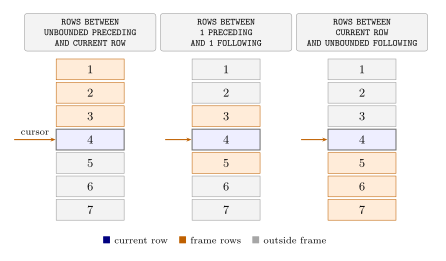
ROWS: grow and shrink
The two canonical ROWS frames go in opposite directions. UNBOUNDED PRECEDING TO CURRENT ROW grows from the partition start; CURRENT ROW TO UNBOUNDED FOLLOWING shrinks toward the end. Together they are complementary — a row
that has accumulated n elements in the left frame has exactly (total − n + 1)
in the right.
select x,
       array_agg(x) over(rows between unbounded preceding
                                   and current row)       as preceding,
       array_agg(x) over(rows between current row
                                   and unbounded following) as following
  from generate_series(1, 5) as t(x);
 x │  preceding  │  following
═══╪═════════════╪═════════════
 1 │ {1}         │ {1,2,3,4,5}
 2 │ {1,2}       │ {2,3,4,5}
 3 │ {1,2,3}     │ {3,4,5}
 4 │ {1,2,3,4}   │ {4,5}
 5 │ {1,2,3,4,5} │ {5}
(5 rows)
array_agg makes the frame contents visible. Each row in preceding gains
one element; each row in following loses one.
Named WINDOW and PARTITION BY
The WINDOW clause names a frame definition so multiple expressions can share
it without repeating the spec. It also composes with PARTITION BY, which
restarts each frame independently per group. Here x/3 creates groups of two
or three rows, and two named windows operate within each group:
select x,
       x/3 as partition,
       array_agg(x) over (partition by x/3) as peers,
       array_agg(x) over w1                 as w1,
       array_agg(x) over w2                 as w2

  from generate_series(1, 10) as t(x)

window w1 as (partition by x/3
              order by x
              rows between unbounded preceding and current row),

       w2 as (partition by x/3
              order by x
              rows between current row and 1 following);
 x  │ partition │  peers  │   w1    │   w2
════╪═══════════╪═════════╪═════════╪════════
  1 │         0 │ {1,2}   │ {1}     │ {1,2}
  2 │         0 │ {1,2}   │ {1,2}   │ {2}
  3 │         1 │ {3,4,5} │ {3}     │ {3,4}
  4 │         1 │ {3,4,5} │ {3,4}   │ {4,5}
  5 │         1 │ {3,4,5} │ {3,4,5} │ {5}
  6 │         2 │ {6,7,8} │ {6}     │ {6,7}
  7 │         2 │ {6,7,8} │ {6,7}   │ {7,8}
  8 │         2 │ {6,7,8} │ {6,7,8} │ {8}
  9 │         3 │ {9,10}  │ {9}     │ {9,10}
 10 │         3 │ {9,10}  │ {9,10}  │ {10}
(10 rows)
w1 grows within each partition; w2 is a one-step lookahead, shrinking to
just the current row on the last row of each partition. peers is a
no-ORDER BY window — it sees the whole partition, the same value on every
row in the group.
ROWS vs RANGE
ROWS advances one physical row at a time. RANGE advances by value — it
includes every row whose ORDER BY value falls inside the specified interval.
With unique values they agree; with skewed data or duplicate values they
diverge significantly.
The squares of 1 through 10 give a concrete case where the values are sparse and the intervals tell different stories:
select x,
       array_agg(x) over w1 as rows_window,
       array_agg(x) over w2 as range_window

  from (select x*x from generate_series(1, 10) as gs(x)) as t1(x)

window w1 as (order by x rows  between 1 preceding and 2 following),
       w2 as (order by x range between 10 preceding and 20 following);
  x  │  rows_window   │ range_window
═════╪════════════════╪═══════════════
   1 │ {1,4,9}        │ {1,4,9,16}
   4 │ {1,4,9,16}     │ {1,4,9,16}
   9 │ {4,9,16,25}    │ {1,4,9,16,25}
  16 │ {9,16,25,36}   │ {9,16,25,36}
  25 │ {16,25,36,49}  │ {16,25,36}
  36 │ {25,36,49,64}  │ {36,49}
  49 │ {36,49,64,81}  │ {49,64}
  64 │ {49,64,81,100} │ {64,81}
  81 │ {64,81,100}    │ {81,100}
 100 │ {81,100}       │ {100}
(10 rows)
w1 always contains exactly 4 values (or fewer at the edges). w2 at x=9
includes {1,4,9,16,25} — every square in the range [−1, 29] — because the
values happen to be dense there. At x=25 the range [15, 45] contains only
three squares (16, 25, 36), so w2 shrinks.
For moving averages and running totals, ROWS is almost always what you want
— a fixed, position-based window. RANGE is the right choice when you want
to aggregate by value proximity: “all events within the last 7 days of the
current row’s date,” where all rows with the same timestamp should be treated
as peers.
GROUPS
GROUPS is RANGE’s cousin, but instead of value distances it counts
distinct peer groups — sets of rows that share the same ORDER BY value.
GROUPS BETWEEN 1 PRECEDING AND 1 FOLLOWING means: the current group, the
group immediately before it, and the group immediately after, however many
rows those groups contain.
Race results make this concrete. In race 890 the ORDER BY is laps DESC, milliseconds — finishers are ordered by laps completed, then by time within
the same lap count. Drivers who completed the same number of laps form a
peer group.
  select code, laps,
         rank() over(order by laps desc, milliseconds) as position,
         array_agg(code) over wr as rows,
         array_agg(code) over wg as groups
    from f1db.results
         join f1db.drivers using(driverid)
   where raceid = 890

  window wr as (order by laps desc, milliseconds
                rows   between 1 preceding and 1 following),

         wg as (order by laps desc, milliseconds
                groups between 1 preceding and 1 following)

  order by position;
 code │ laps │ position │     rows      │                groups
══════╪══════╪══════════╪═══════════════╪═══════════════════════════════════════
 HAM  │   70 │        1 │ {HAM,RAI}     │ {HAM,RAI}
 RAI  │   70 │        2 │ {HAM,RAI,VET} │ {HAM,RAI,VET}
 VET  │   70 │        3 │ {RAI,VET,WEB} │ {RAI,VET,WEB}
 WEB  │   70 │        4 │ {VET,WEB,ALO} │ {VET,WEB,ALO}
 ALO  │   70 │        5 │ {WEB,ALO,GRO} │ {WEB,ALO,GRO}
 GRO  │   70 │        6 │ {ALO,GRO,BUT} │ {ALO,GRO,BUT}
 BUT  │   70 │        7 │ {GRO,BUT,MAS} │ {GRO,BUT,MAS}
 MAS  │   70 │        8 │ {BUT,MAS,PER} │ {BUT,MAS,PER,MAL,HUL,VER,RIC}
 PER  │   69 │        9 │ {MAS,PER,MAL} │ {MAS,PER,MAL,HUL,VER,RIC,VDG,PIC}
 MAL  │   69 │        9 │ {PER,MAL,HUL} │ {MAS,PER,MAL,HUL,VER,RIC,VDG,PIC}
 HUL  │   69 │        9 │ {MAL,HUL,VER} │ {MAS,PER,MAL,HUL,VER,RIC,VDG,PIC}
 VER  │   69 │        9 │ {HUL,VER,RIC} │ {MAS,PER,MAL,HUL,VER,RIC,VDG,PIC}
 RIC  │   69 │        9 │ {VER,RIC,VDG} │ {MAS,PER,MAL,HUL,VER,RIC,VDG,PIC}
(22 rows)
Positions 1–7 are finishers who each completed 70 laps with a unique time —
every row is its own group. ROWS and GROUPS agree because there are no
ties in the ordering.
At position 8 (MAS) the divergence begins. ROWS sees three physical rows:
BUT, MAS, PER. GROUPS sees three groups: the group before MAS (just BUT,
the last 70-lap finisher), MAS’s own group (just MAS), and the entire next
group — all five drivers who completed 69 laps. One boundary step in GROUPS
captures all of them at once.
At positions 9–13 (all tied at 69 laps, all rank 9), the groups column is
identical for every row: it always contains MAS (the preceding 70-lap group),
all six 69-lappers (the current group), and VDG and PIC (the following 68-lap
group). ROWS meanwhile advances one row at a time through the same six
drivers.
EXCLUDE
The EXCLUDE clause removes rows from an otherwise-defined frame. It adds
three options: EXCLUDE CURRENT ROW drops only the current row, EXCLUDE GROUP drops the current row and all its ordering peers, and EXCLUDE TIES
keeps the current row but drops the peers.
The most useful is EXCLUDE CURRENT ROW — it produces “everyone but me”
aggregates that would otherwise require a self-join:
select x,
       sum(x) over (order by x
                    rows between unbounded preceding
                             and unbounded following)             as sum_all,

       sum(x) over (order by x
                    rows between unbounded preceding
                             and unbounded following
                    exclude current row)                          as sum_others,

       sum(x) over (order by x
                    groups between unbounded preceding
                               and unbounded following
                    exclude group)                                as sum_other_values

  from (values (1), (1), (2), (3), (3)) as t(x);
 x │ sum_all │ sum_others │ sum_other_values
═══╪═════════╪════════════╪══════════════════
 1 │      10 │          9 │                8
 1 │      10 │          9 │                8
 2 │      10 │          8 │                8
 3 │      10 │          7 │                4
 3 │      10 │          7 │                4
(5 rows)
sum_all is 10 on every row — the full partition total. sum_others subtracts
the current row: the two x=1 rows each see 9, the x=2 row sees 8, and so
on. sum_other_values uses EXCLUDE GROUP on a GROUPS frame: it subtracts
all rows that share the current value — both 1s disappear together, both 3s
disappear together, leaving 8 for either end and 4 for the middle. A
self-join would need at least a CTE and a subquery to express the same thing.