Running Totals and Moving Averages
SUM OVER with ORDER BY gives you a running total. Add a ROWS BETWEEN frame and you get a sliding window — a moving average that looks back exactly N rows.
SUM(x) OVER () adds up all the x values and puts the total on every row.
Useful, but a fixed total is just a scalar wearing a window-function costume.
The interesting version adds ORDER BY:
select x,
       array_agg(x) over()           as all_rows,
       sum(x) over()                 as total,

       array_agg(x) over(order by x) as rows_so_far,
       sum(x) over(order by x)       as running_total

  from generate_series(1, 5) as t(x);
 x │  all_rows   │ total │ rows_so_far │ running_total
═══╪═════════════╪═══════╪═════════════╪═══════════════
 1 │ {1,2,3,4,5} │    15 │ {1}         │             1
 2 │ {1,2,3,4,5} │    15 │ {1,2}       │             3
 3 │ {1,2,3,4,5} │    15 │ {1,2,3}     │             6
 4 │ {1,2,3,4,5} │    15 │ {1,2,3,4}   │            10
 5 │ {1,2,3,4,5} │    15 │ {1,2,3,4,5} │            15
(5 rows)
array_agg() makes the frame visible. sum() over() with no ORDER BY
uses an implicit frame of all rows — total is 15 on every row. sum() over(order by x) uses the default frame RANGE UNBOUNDED PRECEDING TO CURRENT ROW, so the running total accumulates: 1, 3, 6, 10, 15.
The frame is what changes. ORDER BY inside OVER does not just sort —
it activates a default frame that grows with each row.
Moving averages: fix the frame width
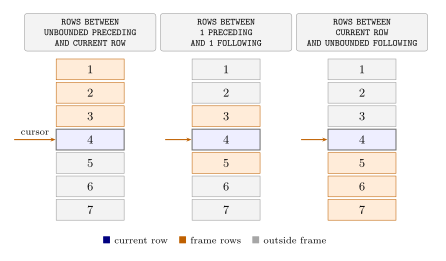
A running total grows without bound. A moving average uses a fixed-width
sliding window. The default frame (RANGE UNBOUNDED PRECEDING) is not a
sliding window — it always starts at the beginning. To slide, you need an
explicit ROWS BETWEEN clause:
 select x,
        array_agg(x) over w      as window_contents,
        round(avg(x) over w, 2)  as moving_avg

   from generate_series(1, 5) as t(x)

window w as (order by x rows between 1 preceding and current row);
 x │ window_contents │ moving_avg
═══╪═════════════════╪════════════
 1 │ {1}             │       1.00
 2 │ {1,2}           │       1.50
 3 │ {2,3}           │       2.50
 4 │ {3,4}           │       3.50
 5 │ {4,5}           │       4.50
(5 rows)
ROWS BETWEEN 1 PRECEDING AND CURRENT ROW means: include the current row
and the one immediately before it. For x=1 there is no preceding row, so the
window is just {1} and the average is 1.0. For x=3 the window is {2, 3} and
the average is 2.5. The frame truly slides.
The WINDOW w AS (...) clause names the definition so you can reuse it
across multiple aggregate expressions without repeating the frame spec.
ROWS vs RANGE
ROWS counts physical row positions. RANGE counts logical value ranges.
With unique values in the ORDER BY column they behave identically. Duplicates
reveal the difference.
select x,
       array_agg(x) over (order by x rows  between unbounded preceding
                                                and current row) as rows_frame,
       array_agg(x) over (order by x range between unbounded preceding
                                                and current row) as range_frame,
       sum(x)       over (order by x rows  between unbounded preceding
                                                and current row) as rows_sum,
       sum(x)       over (order by x range between unbounded preceding
                                                and current row) as range_sum
  from (values(1),(1),(2),(3),(3)) as t(x);
 x │ rows_frame  │ range_frame │ rows_sum │ range_sum
═══╪═════════════╪═════════════╪══════════╪═══════════
 1 │ {1}         │ {1,1}       │        1 │         2
 1 │ {1,1}       │ {1,1}       │        2 │         2
 2 │ {1,1,2}     │ {1,1,2}     │        4 │         4
 3 │ {1,1,2,3}   │ {1,1,2,3,3} │        7 │        10
 3 │ {1,1,2,3,3} │ {1,1,2,3,3} │       10 │        10
(5 rows)
ROWS advances one physical row at a time. The first x=1 row sees only
itself; the second sees both. RANGE treats all rows with the same order
value as peers and includes them all at once — the first x=1 row already
sees both 1s, and the first x=3 row already sees both 3s. rows_sum
reaches 10 only on the last row; range_sum jumps to 10 on the first
occurrence of 3.
For running totals and moving averages, ROWS is almost always what you
want — it gives you a precise, position-based window. RANGE is the right
choice when you want to aggregate by value proximity rather than physical
position — for example, “all events within the last 7 days of the current
event’s date,” where duplicate timestamps should be treated as peers.
A practical pattern
Running totals and moving averages appear everywhere in time-series work:
cumulative revenue, rolling 7-day active users, 30-day moving average
response time. The pattern is always the same: one SUM or AVG with an
OVER (ORDER BY time_col ...) clause, with a frame if you need a fixed
window rather than a cumulative one.